Clicky

on August 31 2012 in Sims Game Patches/Updates

Patch 1.38: New Features


There are new features available in game for those who update to patch 1.38. These features are available to all players with or without Supernatural. Some images below have been re-sized to fit the post, so click to enlarge!


Full “In Game” Store

 
Patch 1.38 features an addition to build/buy mode that creates the ability to view the entire Sims 3 Store in game. This option is not optional, but you will not see it unless you choose the “See only Store items” button. Disabling Shop Mode will not rid this feature either.


This feature also provides your Simpoint balance

Patch 1.38


 ————————————————————————————————————————————


New Population Controls

 
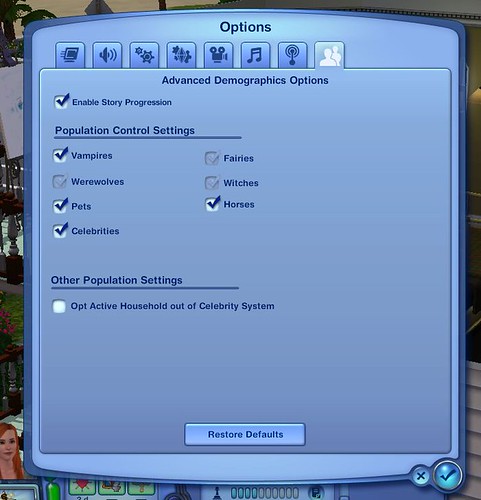
New population controls have been added that allow you to select/deselect options for your game. These options are game-wide, so you will not be able to customize individual saves.


:!: If you have Late Night installed, you will also have the option to turn off Celebrities & Vampires.
 
:!: If you have Pets installed, you will also have the option to turn off Horses and Pets
 
:!: If you have Supernatural installed, you will also be able to Turn off Witches, Fairies & Werewolves


Thanks to Lisa & Moza for the screen! :)  

Population


————————————————————————————————————————————


 New CAS Options

 
Patch 1.38 adds brand new Skin Tones & Sliders for your Sims. Included is a “Rainbow” like skin tone which allows you to create very unique Sims.
 
The new Face sliders that have been added are: Ear Orbit, Ear points, Jaw Underbite, Brow Definition & Nostril Rotate
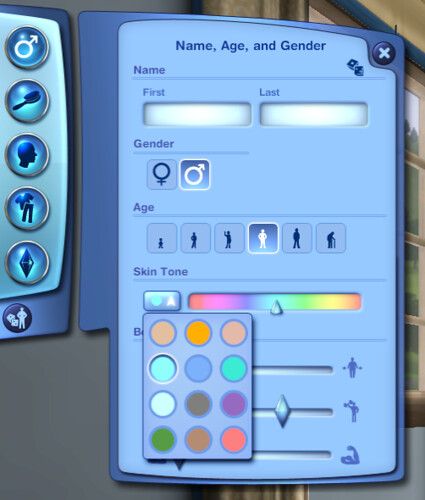
 
Skin Tones


  ————————————————————————————————————————————


 Gifting System

 
A new feature has been added to the in game profile. You now have the options to send and receive gifts from within the game. Once you first log in, you will find your first gift waiting for you from The Sims team.


:!: When you receive a new gift and you are logged in, you will be notified via notification and/or the mailbox on your home lot. Gifts can be sent and received via the mailbox as well.


:!: You are only allowed to send 5 gifts per day. There is also a tracking system to let you know how many you have sent out.


:!: Gifts include Elixirs and everything from Cars to Simoleons.


To send or receive a gift, use your in game profile, or the mailbox on your home lot.
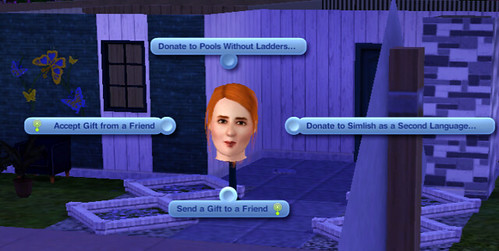
 
Gifts
 
Once you have selected the gifting option, you will be greeted with a pop up. From this screen you will be able to choose a friend, select a gift and even attach a special note. Friends will receive notification of a new gift and accept.


:!: When accepting a gift, you will be directed to your Gifting Section in your profile.
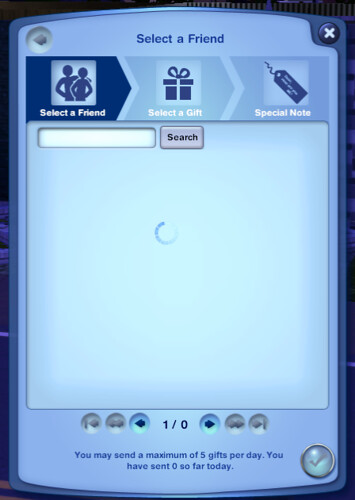
 
Gifting


  ————————————————————————————————————————————


 Updated Collection Journal

 
Patch 1.38 expands the Collection Journal and allows you to view everything from what you’ve collected, to what types of collectibles there are in town. The new journal can be found in the UI under your Sims inventory. This journal also keeps tabs on how many of each collectible you have collected.
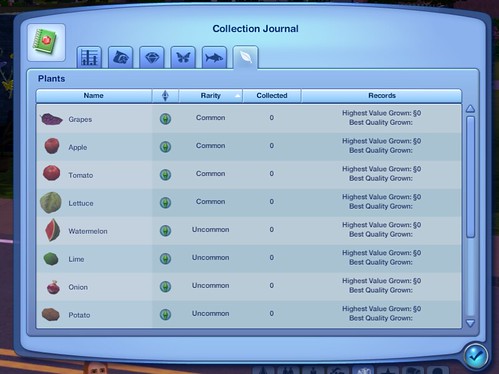
 

Collection Journal 2


 ————————————————————————————————————————————


 Create A Ghost (Including Supernatural’s)

 
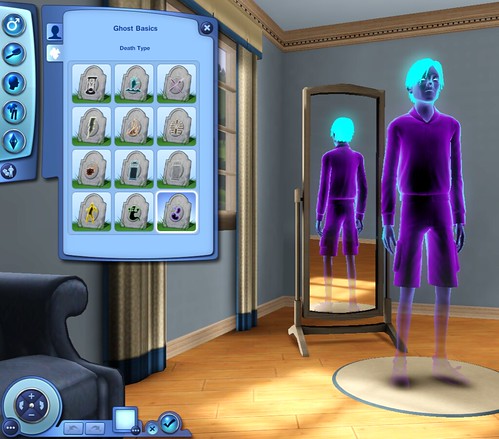
Patch 1.38 has updated a ghost’s CAS options by adding the ability to choose death types for Sims, and keep them. The easiest way to make it happen according to Tom and Annabelle, is to Edit the - already ghostly - Sim in CAS, Choose a death type, Save to the Bin and exit. Once you go into Edit Town to “Create a New Household”, you will be able to select the ghost and drop it into your household.
 
I tested this to see if it works, and it sure does! It is note worthy that you remember which Sim you customized as a ghost because it will show up in your CAS Sim Bin as a regular, non-ghostly, Sim. If you Edit a Ghost in CAS, make changes and then exit, the Sim will not change appearances. The steps above must be followed to make this happen.


All credit goes out to swdknight who first discovered this. :)


Ghosts in CAS


»
82 Comments
  1. ScifiSOS says:

    Actually I am having a problem just loading the patch itself. It downloads all the way, however, it says that there was an error interupting the patch and to run it through again each time I do it.

    Anyone else with this problem?

  2. Melanie says:

    I am SO updating!!!! THIS PATCH LOOKS AAMMAAZZIINNGG. I have been wanting the “Opt Active Household Out Of Celebrity System” for A BILLION YEARS and I’m SOOOO happy they did it!!!! It looks like EA is FINALLY pulling their CRAP together! (now we just need Showtime fixed, but thats gonna take a LONG time.)

  3. ShortyBoo says:

    For those who have the patch, do the skintones (both default & non-default) still work properly? I remember back when the leaked SN patch that was later removed came out there were people reporting that it broke the ramps for custom skintones. I don’t remember the details exactly, but I just want to make sure everything will still work before I install the patch.

  4. werewolfgirl120 says:

    yeah!!!!! am sooo updating right now’s i am so freaking in love with the new skintons <3333333333333 I so loves you EA!

  5. MOi says:

    Oh MY! BEST PATCH EVER!!!!!!

  6. Moi Lolita says:

    I have problem with patch.. After installing i can’t enter game options and enter buy mode and panel sim

  7. XolgaFan says:

    Im starting to worrying that they will make sims 3 another idiot online game which will ask you every 5 minutes pay for items…
    Im not sure if I will keep playing this game anymore..:/

  8. MItch says:

    There’s new store tuning in this patch. One for a “UberStove” which can be upgraded to self cook for you and apparently plays music. Also tuning for a vibrating heart shaped bed and the tea set which appears to have a skill associated with it. The tuning for the vending machines still exist too but it says EP5 which means they were cut from Pets so it’s unknown if we will ever get those. Though the pinball machines in the store were also cut from pets and those were released. Also it appears you could create candles with the alchemy station but it got cut from the game.

  9. Misty4m says:

    For those who are having issues maybe this could help you.

    After I installed the patch and started my game I kept getting a error during the loading screen and the game would crash, after trying two more times and getting the same thing I removed my MOD folder and the game started just fine.

    (I also saved a backup game before starting install the patch)

    Now today I plan on finding out what is causing the issue by placing one MOD at a time back into the MOD folder.

  10. Ramon says:

    I dunno i want this..

  11. Matthew says:

    I was playing my game after i downloaded the patch and cant find the drain pipes! HELP!!! Please

  12. alexa996 says:

    I foung a bug (at least in my game) – in collection journal, fish tab doesn’t work. Is anyone else finding this bug?

  13. Conclue says:

    So is everyone loving the new celebrity fixes? I wish I could get into my game and fix all my Sims :)

    I went to the forums but the site is down. I would have thought I would have found lots of threads of excited simmers. Where exactly is the 1.38 patch thread?

  14. Bryce says:

    It says my game is up to date but it isn’t???

  15. nnytak says:

    What about the new moodlets and socials for Vampires? I read that there were new ones but don’t know what they are.

  16. Sam says:

    Anyone have any idea when Master Controller will be updated for this patch??

  17. Nicole says:

    I’m not updating until Nraas update’s his mods. But to those who were successfully able to, is the game still pretty smooth?

  18. Amy says:

    I for one will not be buying SN now for several months or patching till Seasons because this patch has caused a lot of problems with custom sliders and some people are having issues with non-default skins sticking. Very upsetting. So those folks, like me, have to wait it out for a solution by the creators.

  19. Emma says:

    Fangs and bite marks here also added in CAS under accessories.

Leave a Reply