Community Blog: Why Your Sims React Differently To Fire and Death!

In Case of Fire…

We’ve been making improvement to how Sims react to events happening around them in The Sims 4. The first major change to this Reactions system was the Jealousy update, which improved how Sims react to their loved ones cheating on them. Fire and death are two huge moments in any Sim’s life, so they were next on the list to make bigger and better – and earlier this month, we did just that.

Though it might sound grisly, fire and death (including death by fire!) have been a core part of The Sims franchise ever since the first Sims game was released over 15 years ago.

Advertisement

TS4_360_GHOSTS_REHEAT_01_003

Fire fire!

We noticed that sometimes, Sims were reacting in a lukewarm (pun intended) fashion to the raging infernos around them. On some occasions they wouldn’t even recognize a fire was going on near them and continue doing what they were doing before. This led to some unbelievable situations, like a Sim watching their favorite TV show, oblivious to the fact that their stove was on fire. (We’ve all sort of been there, right?)

We’ve made improvements so that Sims realize that there’s a fire sooner. When one Sim discovers a fire, they’ll also alert the rest of the Sims in the house to the fire. This’ll give all the Sims a chance to escape the building in case the fire grows out of control. Once they reach safety, they’ll sigh in relief and play different animations depending on their traits. Most Sims will panic, but evil Sims will cackle, and Gloomy Sims will cry. Factoring in the traits of your unique Sim into our Reaction system is one of the ways we’re making Sims more believable than ever.

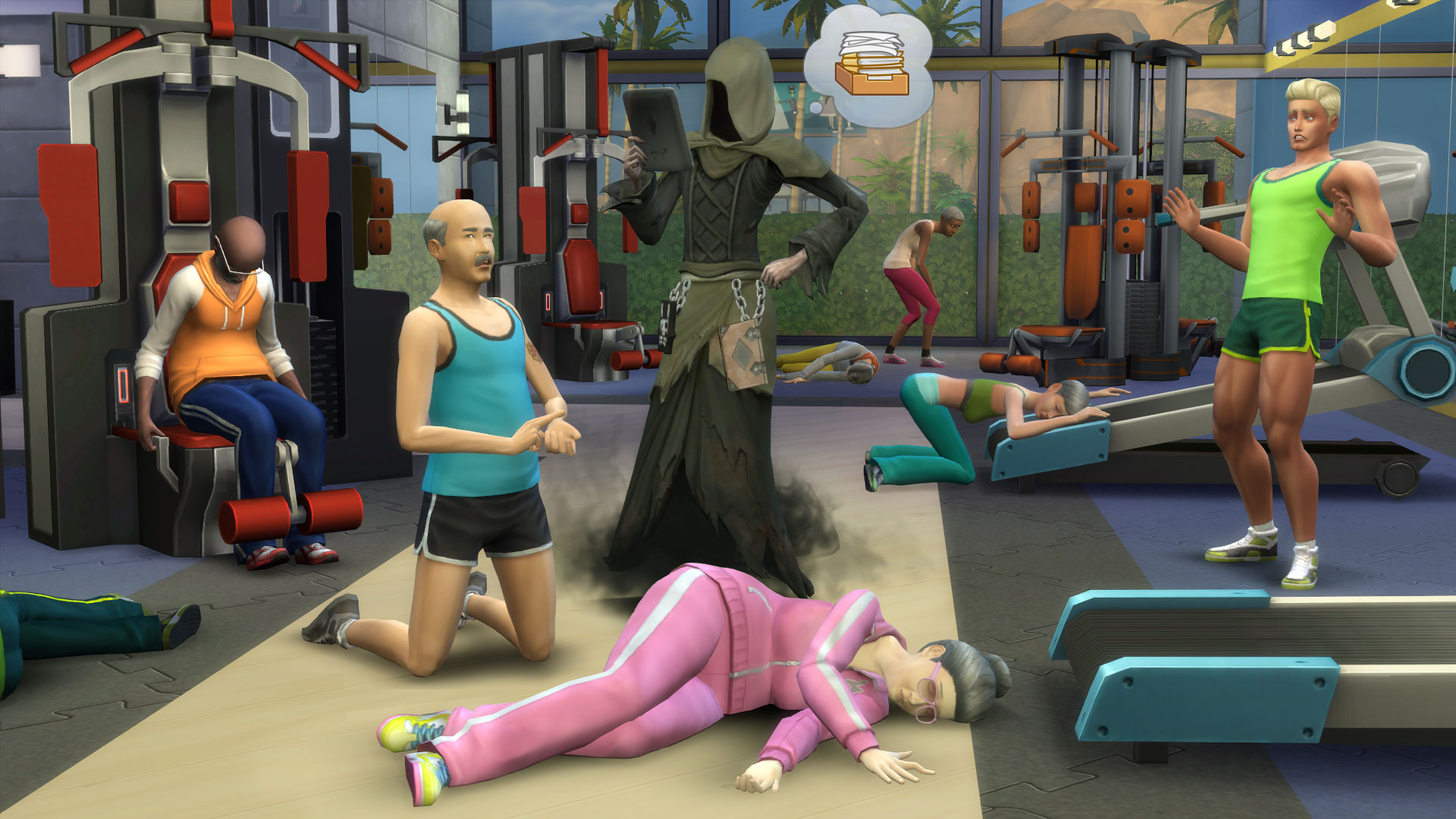
TS4_336_DEATH_OF_SIMS_05_002

Grim Affairs

Death is a part of every Sim’s story, and we weren’t totally satisfied with how Sims reacted to the grim occurrence when it did happen near them. Sims would often mourn for the fallen Sim, but the moment that ol’ Grimmy showed up to reap them, they’d be perfectly fine afterwards. This didn’t feel believable. We’ve made several improvements to how Sims react to death and its steward, the Grim Reaper.

Advertisement

First of all, Sims will play an initial reaction animation when another Sim dies. It felt unrealistic that a Sim would see a body and just begin crying, so we added a set of animations that play upon “discovering” a dead Sim. In addition to this, Sims will now react differently to another Sim’s death depending on their relationship with the recently deceased. Sims with higher relationship will sob more heavily, while Sims with very negative relationships (like enemies!) might even cheer at the Sim’s death. How morbid!

TS4_336_DEATH_OF_SIMS_03_004

We also felt like the Grim Reaper wasn’t getting enough respect. The embodiment of death would appear, and Sims around him would simply continue doing what they normally did. We don’t know about you, but if the Reaper appeared next to our Sim, we’d sure freak out! After this past update, when the Grim Reaper appears to reap a dead Sim, other Sims around him will gasp and react to the Reaper’s presence.

Speaking of the Grim Reaper, remember that you can plead with him to spare your Sim’s soul. We’ve added some new reactions if your plea succeeds!

Advertisement

We hope you’ll have fun playing, and let us know about all the ferocious fires and deadly situations your Sims get into.

Advertisement
Advertisement
Advertisement

The Sims 4 Get Together: More Twitter Tidbits by Gurus

Gurus answered some questions on Twitter, and here are their answers!

Advertisement

The Sims 4 Gallery: How Does Maxis Determine Favs?

Looking to increase your chances of getting a “fav” on your latest Sims 4 Gallery creations? Well SimguruDrake has taken to the official forum with an inside look at the process behind selecting favorites on the official Maxis Gallery account.

Hello everyone!

I’ve been working with our team to get something together for all of you wonderful builders and Sims creators to know our process when providing a Maxis Fave.

Advertisement

I want to first address that yes, we do check lots and Sims that we curate to make sure that they appear in game as they do in the screenshot. There are several things that we check for as we want all players to have the best experience with your creations.

I want to note that we do not enable MOO when checking any lots / rooms.

Households

  • Does the household have a backstory? (Not a must have but we really do enjoy reading the stories you create and think that other players do as well.)
  • Does the household have custom content? (If so it will automatically be rejected as it is not official Maxis created content.)
  • Does the household have more than one look? –Nothing like downloading a Sim who only has their Everyday attire done and the rest were simply forgotten.

Rooms

  • When placing the room does it appear as it does in the thumbnail?
  • What panning around the room do you notice any flickering?
  • When Sims enter the room can they view and use the objects within it?
  • Does the room have any custom content? (If so it will automatically be rejected as it is not official Maxis created content.)

Lots
This is where things get tricky. We know a lot of you use the MOO cheat (and we LOVE the amazing things you create with it) but not all users are aware of this cheat. So when we check the lots we do so without enabling cheats.

  • When placing the lot does it appear as it does in the thumbnail?
    • Are there any floating, missing, or resized objects?
  • When panning around the lot do you notice any flickering?
  • When going room by room do you notice if there are any objects flickering that used MOO to place them there?
  • Can Sims get to every room in the lot?
  • Can Sims get out of every room in the lot?
  • If there is water can they easily swim in it and get out without issues?
  • Can Sims view and use the objects within the lot?
  • Does the lot have custom content? (If so it will automatically be rejected as it is not official Maxis created content.)

Additional Questions

  • Are you looking to highlight new/unknown creators?
    • Absolutely! We like to keep it a mix of new/unknown creators and established creators.
  • Do you like to find the unique/unusual or do you like things to be simple?
    • Actually we really love both. What we try to do is always keep it a mix, showcase the really crazy and unique ones you come up with and also highlight the more simple homes so that there is always a variety.
  • Do you only choose things that would do well on social media/promotional videos?
    • The builds we showcase on social are pulled from those we have faved and passed our curation process. We like to do a mixture on there as well though sometimes we do have months where we have themes (example: Halloween for October, we wanted to highlight some of the really amazing spooky homes that were created but also highlight some non-Halloween themed things as well.) We also like to showcase a mixture of new and established builders there as well.
  • Does there have to be a specific price range for a build?
    • Nope  If a higher priced build doesn’t get a fave it means they may have failed one or more of the criteria above.
  • Does the build fitting into the landscape help?
    • Good question! Since players tend to choose where they want to place the lot and don’t always use the same one that you created it on it doesn’t play a huge factor. BUT what does help with landscaping is actually adding life around the build. Like flowers, bushes, trees, etc. to make it really feel like it’s lived in. It won’t hurt you if you don’t have those things but it really does help!
  • Besides being nominated in the recommendations thread, what other method can creators go about in order to get Maxis’ eye on their lot? Does Maxis look at any of the showcase threads? Is it a good idea to try to reach out on social media (i.e. Twitter and Facebook)?
    • We check out lots that are shared with us on Twitter, Facebook, and Tumblr and even our SimGuru’s pass along lots that are shared with them. We do try to keep up with the showcase / challenge threads that are found throughout the forum.