
Maxis Moves Development of The Sims Mobile to Firemonkeys Studio

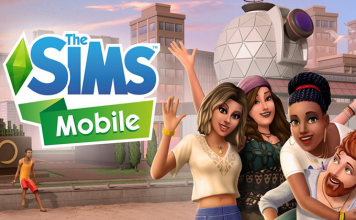
EA has announced that the Maxis Studio is officially moving the development of The Sims Mobile over to the Firemokeys Studio. With years of experience and development with The Sims FreePlay, Firemonkeys will work with Maxis for a smooth transition. Content updates will be delayed during this time, but Maxis assures players that there’s more to come.

Once the announcement was made, numerous Sims Mobile gurus announced that they will now transition over to The Sims 4 development team, or have updated their Twitter bios to reflect their move over to the new studio.

Advertisement

Community Blog: Introducing Moschino X The Sims

The Sims team has released a blog detailing the collaboration with Moschino

Moschino Madness

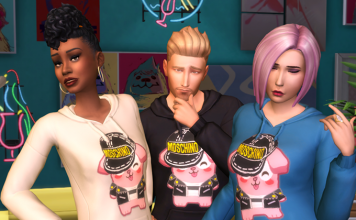
Simmers, have you heard the news? The Sims™ has collaborated with the one and only Moschino! With creative director Jeremy Scott at the helm, this fashion house is famous for its tongue-in-cheek designs and unapologetic aesthetic. And, with the brand’s affinity for pop culture, The Sims provides a fabulous source of inspiration for a new collection. Yes, the Moschino x The Sims capsule collection is in select Moschino stores now!

Want to get your Sims in on the fun, too? Well, look no further. You can now dress your Sims in a Moschino-branded Freezer Bunny hoodie! This includes The Sims 4*, The Sims Mobile, and on April 30, 2019, The Sims FreePlay. So, no matter how you play The Sims, they can rock the latest style.

Advertisement

The Gig is Up

But, that’s not all! Have your Sims ever wanted a different kind of career? One that doesn’t require them to be stuck at a workplace for eight or more hours? Well, we’d like to introduce the Freelancer career for The Sims 4 on PC! Your Sim can now have the freedom to create their own work schedule while exploring other ways to express themselves.

Here’s how it works: First, choose a freelancing agency to help your Sim land gigs. Then, they’ll work from home, complete tasks, get paid, and receive performance boosts.

So, what will your Sim do with their free time? They’ll finally have flexibility to figure that out! Check out the Freelancer career, and your Sim will be on their way to a well-rounded lifestyle.

Advertisement
Advertisement

Augmented Reality Comes to The Sims Freeplay

Electronic Arts has announced today that The Sims FreePlay now allows iOS Simmers to transport their Sims into augmented reality. Below is the official announcement blog.

As a part of our Brilliant Backyards update, The Sims FreePlay allows *iOS Simmers to cross the digital divide and transport their Sims into augmented reality. With thousands of objects at your fingertips, use Apple’s ARKit 2 technology to see your Sims’ Dream Homes come to life. Place your Sim houses anywhere they can dream of and come back to visit them any time. Collaborate and share experiences with a friend through the brand new real-time cooperative build-mode! It’s a Sims experience unlike anything you’ve seen before!

Advertisement

Here’s how you use AR Mode*:

*Note: AR Mode is only available to iOS users running iOS 12 and requires a device with an A9 processor or above.

How to activate AR Mode

To activate AR mode, visit the town map screen. Simmers with compatible devices (see our FAQ for the full list) will see a new green button on the upper right side of the screen.

How to Add a New AR house

To create a new AR house lot, select, ‘New’, and name the space. Aim the device’s camera at the surface where you wish to place a home lot and follow on-screen prompts for a successful placement. We recommend non-glossy, textured surfaces. Also, avoid pure black or white surfaces.

Advertisement

A successful scan will place a basic home lot with a grid. You can resize/rotate the home lot by pinching and rotating the screen. When it comes to editing, for best results, resize a room to fill the device screen. Tap, ‘Save AR Space’ to save the lot at that location.

Once an AR Space has been saved, Simmers can begin styling their brand new AR home with special Build Mode functionality. In AR Build Mode, all items you’ve unlocked in-game can be placed as many times as you wish. There is no cost to placing items in AR mode.

Returning to a Saved AR Space

Select the saved AR space from the AR space menu. You will then need to match the space’s snapshot with the existing real-world location. Once the two match up, the house lot will appear (and you will be prompted again to save the Space).

Advertisement

You can also Relocate (and Delete) an AR house by tapping on the cog icon on the save AR Space.

Things you can do in AR Mode:

The main difference between AR mode and the regular game is that you use the device’s camera to move around the AR space. This allows you to get up close to your Sims and opens up a whole range of exciting new perspectives – inside, outside, and around your Sims’ houses. Zoom in, pan out, and explore!

Call any of your Sims to your AR home lot via the Sim Tracker. If your Sims have any pets, they can be called as well. Your Sims are free to interact with objects as they would in any other house lot!

Advertisement

Hosting a Multiplayer Session

Grab a fellow Simmer and together, build a paradise fit for your Sims in real-time! Make sure your Simmer Friend is in close proximity and they have AR. When in your AR space, tap the blue Multiplayer button in the bottom left corner of the screen.

Your device will immediately begin searching and bring up a list of nearby AR-ready Simmers. Invite your friend to join in AR!

Joining a Multiplayer Session

If you want to visit a Simmer’s house in AR, you will need to be close to the hosting Simmer. When the Host taps the Multiplayer button, you will need to tap the Search button at the bottom of the AR Spaces menu.

Advertisement

You will come upon the Host’s list, so when they tap ‘Connect’, match their space (use the image in the bottom right corner of your screen), their house will appear and you can jump in and start collaborating on their ultimate house in real-time.

Other Notes about AR

●      Sims will remain in AR until they are called home.

●      Simmers cannot take what is in AR with them back to the normal game. AR mode items cannot be sold or stored. Because AR build-mode items are free, they disappear if removed.

●      Invited Guest Simmers cannot interact with the host’s Sims and they cannot bring in their own Sims.

●      Simmers cannot collect any kinds of resources in AR.

●      Simmers will not receive any XP from doing tasks within AR.

●      Actions can be cancelled in AR for no cost.

●      Simmers will not gain any Quest progression by interacting with objects in AR.

●      Sim Motives are set to 50% in AR and do not increase/decrease while visiting an AR Home Lot.

●      Sims cannot undergo an Ultimate Makeover or Have a birthday in AR Mode.

Eligible Devices

The Sims FreePlay AR feature is supported by iOS 12 and devices with A9, A10, A11 or A12 chips, which include:

Advertisement

●      iPhone 6s and 6s Plus

●      iPhone 7 and 7 Plus

●      iPhone SE

●      iPad Pro (9.7, 10.5 or 12.9) – both first-gen and 2nd-gen

●      iPad (2017)

●      iPhone 8 and 8 Plus

●      iPhone X

●      iPhone XS, XS Max and XR

Go forth, and explore the Sims Freeplay from a fresh and unique perspective!

Download the Brilliant Backyards Update now*!

*Network fees may apply

The Sims Freeplay to Be Discontinued in Some Countries on July 5th

Fellow simmer, Wulfsimmer, has shared a notice they received today while playing The Sims Freeplay. According to the official statement, The Sims Freeplay will no longer be available in Saudi Arabia, UAE, Oman, Kuwait, Qatar, and Egypt starting July 5th.


You will still be able to play the game after the July 5th date, but after some time the game will no longer function as it should. For more info on the game, see the official website.

Advertisement
Advertisement

Community Blog: Pregnancy Update Coming to The Sims Freeplay

The Sims team has announced a brand new update for The Sims Freeplay

Your eyes do not deceive you! Pregnancy, our most highly-requested feature ever is finally here! It’s time to nurture a mother through the journey, challenges, and changes of pregnancy, creating never-before-told stories in The Sims FreePlay.

See your Sim’s baby bump grow over three trimesters. Mix and match a variety of maternity wear– specially designed for your Sim’s growing belly. Nurture your pregnancy by attending yoga and aerobics classes. Prepare the perfect nursery with a variety of super cute, themed collections from the brand-new Maternity Store. Plan a beautiful baby shower for your new arrival!

Advertisement

Brace yourself for the ultimate play date with the return of the Day Care Live Event! Design your own Day Care, where you can nurture your babies and toddlers with a Play Kitchen, Reading Island, Change Tables, and more. Unlock the Toddler Playground, where your little ones can slide, seesaw, and swing to their hearts’ desire.

Event Dates:

  • A Bump-y Road Discovery Quest: 8-day event starting June 19 (AEST)
  • Day Care Live Event (Rerun): 10-day event starting June 24 (AEST)
  • Long Hair Hobby Event (Rerun): 6-day event starting July 9 (AEST)

Complete your SimTown families today!

Follow us on Facebook, tweet with us on Twitter, and double-tap our posts on Instagram!

Download The Sims FreePlay here*!

*Network fees may apply

The Sims: Download the Official Fan Kit

The Sims team has launched a Fan Art Kit on their website, available to all players! Head to this page here to accept the Terms of Use and download! The kit includes various renders and screenshots from The Sims 4!

Hello Simmers! We love the content made by our fans, so we created this Fan Art Kit just for you. We hope you have a fantastic time making great, original content using these images. Two quick legal notes:

Advertisement

1) Your use of Fan Art Kit Materials must be non-commercial and you may not charge a fee, seek monetary contributions, or offer any goods or services for a fee or other consideration. However, you may monetize content that incorporates Fan Art Kit Materials through passive advertisements, including on your fansite or video sharing sites such as YouTube. Any advertisements must comply with these Fan Art Kit Terms.

2) Your use of Fan Art Kit Materials must be tasteful and shall not include advertisements or links to websites promoting or containing any of the following: Hacks or cheats; Inappropriate or obscene content; Inflammatory or offensive content; Unlawful or infringing content; or Other objectionable content, as determined by EA. Thank you so much for being a part of The Sims community! Love, The Sims Team


Advertisement

Community Blog: Behind the Scenes with The Sims FreePlay

EA has released a behind the scenes community blog detailing the Hair Salon experience released recently for The Sims FreePlay.

We sat down with The Sims FreePlay Producer, Joshua Birse, in Melbourne to learn more about the update. While Josh enjoyed his own hair experience, he shared where the team’s creative inspirations came from, and why they decided to do a Hair Salon event.

Advertisement

Why did you decide to do a Hair Salon experience in The Sims™ FreePlay?

One thing I know about our players is that they love hair! It’s super popular, and players love seeing what new and fresh styles we have on offer. However, in real-life it’s not just about the hair, it’s also about the lifestyle and experience that surrounds it. A new cut is not just about the end result, it’s about the whole experience!

We wanted to translate this experience in to the game and allow players to pamper their Sims and give them the full Hair Salon experience. To me, this is the natural expansion on a very popular fantasy in The Sims FreePlay.

Josh having the full hair experience at Kings Domain Barber Shop, in Melbourne, Australia

How did you ensure the update was fresh and relevant within the fashion industry?

One of the best things about my job is the time I spend researching fashion, pop-culture and celebrity gossip. What’s even better is that I get to share this with people on the team. We have a number of EA Firemonkeys employees that are up to date with all the latest in fashion trends and celebrity sagas, so they’re always good to bounce ideas off of.

Advertisement

Social media (and the internet in general) is the melting pot of inspiration for themes and content. We work through these as a team and see what neat ideas we can come up with that can bring a new experience to the game. Once we have a pool of ideas that we think players would love, and an idea of how to build it, we collaborate with our Sims FreePlay community.  They let us know if our ideas are on point, if they need a little more love, or occasionally if it’s not something they’re too keen on (hopefully not too often!).

What are some of the features players can expect in the Hair Salon experience?

“It’s not just hair, it’s a lifestyle” was our internal tagline for the update and we used this to guide the team into thinking big! We know players love hair, but what can we do to expand the fantasy? How do we go bigger and make it more than just hair?

The idea started with making a hairdressing community lot, which would be awesome – but what’s even better is giving players the flexibility to create and customize their own Hair Salon! The Hair Today, Gone Tomorrow event leverages the creativity of Build Mode and gives players all the bits and pieces they need to build their own Hair Salon studio. Oh, and a bunch of the latest hair trends of course.

Advertisement

What are some of the small details that The Sims FreePlay players will be excited about when they customize their Hair Salon?

The event allows players to collect all the necessary items to build their own salon, ranging from the smaller bespoke items like the product shelves, magazine rack and the waiting room seats to the larger iconic pieces such as the barber’s chair, hair dressing vanity and hair washing station (each with new actions). What’s awesome is that you can use anything else in Build Mode to customize your salon and make something truly unique.

How did you collaborate with other teams on this update?

The Fashionistas are a group in the EA Firemonkeys studio that are really into fashion and design. I use this team quite often to sources ideas and reference materials.

Advertisement

For the hair event I gave them the afternoon challenge: Give me the top 10 hair styles currently on trend.

We would then sit with the art and design team to work through which styles are artistically viable and how they fit into the game design.

I’m always surprised to learn what’s happening in the high fashion industry (there’s some crazy catwalk looks out there!) through to the subtleties of contemporary hair dressing. Such a fun job!

Advertisement

What was your favorite part of the development process?

Like in every update, I love seeing the development team getting excited about creating new content. Even though The Sims FreePlay has been in live service for five years now, the Hair Today, Gone Tomorrow event is a testament to how fresh, relevant and on trend our update content is. Our hair game is strong.