Media Development Authority, (Singapore’s version of the ESRB), has issued their rating for University Life. January 8th, can’t come soon enough! 😛
Thanks ErikDarling!

Sims 4 News and Game Guides
Media Development Authority, (Singapore’s version of the ESRB), has issued their rating for University Life. January 8th, can’t come soon enough! 😛
Thanks ErikDarling!

Achievement: Crime Never Pays
Description: You’ve done the crime, con artist – do the time.
Type: Silver
Expires: December 12th, 2014
The Sims 3 Store has made available free Santa Hats for Female & Male Adult Sims. These items were once available as a bonus for purchasing a simpoint bundle, but they are now available for free in the Sims 3 Store. Make sure to grab them now while they’re available!
Click Below!

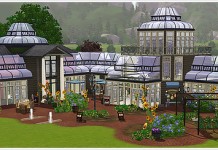
If you own the Stone’s Throw Greenhouse, a weather fix has been released by the Store Team to correct the roofing issue. You will need to uninstall and re-download the greenhouse in order for the update to take affect. See SimsGuruCopeland’s post for more info.
Issues that have been addressed with the updated Greenhouse Venue:
Rain and snow will no longer fall into the Greenhouse Venue.
o The Greenhouse Roof pieces now turn off the visibility of tiles in their footprint area. So if you are building your own Greenhouse, this will allow you to place down a flat roof, place the Greenhouse Roof pieces on top, and still be able to see into the room below.
o Please note: if you do not place a flat roof down first, snow and rain will still get into your Greenhouse.
Plants will no longer go Dormant inside the Greenhouse Venue.
o If you are building your own Greenhouse, make sure it meets all the requirements to flag it as a room (fully walled and fully roofed).
o Outstanding issue: Some harvestable plants still get the frost texture even though they are not going dormant. This is a bug that must be addressed by the Expansion Pack team, and they have a promising solution that they are testing right now.
Installation instructions for those that have already installed old Greenhouse:
1. VERY IMPORTANT: using your Launcher, uninstall the old Greenhouse first
2. Visit this page to download the updated Greenhouse: http://store.thesims3.com/setsProductDetails.html?productId=OFB
-SIM3:58192 (your download should be 36.99MB)
3. Install the new Greenhouse from your Launcher
4. If you still have previously placed Greenhouses in your world, you will need to delete them and place down the new Greenhouse
5. Enjoy!
Important Notes:
If you accidentally install the new Greenhouse without first uninstalling the old, there is a possibility that you will encounter various problems with your Greenhouse. If this happens, please try the following to correct the issues:
1. Uninstall both versions from your Launcher.
2. Close your Launcher
3. Open your Launcher and verify that no Greenhouse content appears in your Installed Content Tab. If none appears, install the new Greenhouse, skip the remaining steps, and enjoy! Otherwise, uninstall them again and close your Launcher once more.
4. Open your Launcher and verify that no Greenhouse content appears in your Installed Content Tab. If none appears, reinstall the new Greenhouse, skip the remaining steps and enjoy!
5. If they are still appearing in the Installed Content Tab of your launcher or you are still having problems, you will need to delete your DCCache and DCBackup folders, typically located here: C:\Users\<yourusername>\Documents\Electronic Arts\The Sims 3. Please note that this will DELETE ALL OF YOUR INSTALLED CONTENT! (If you have Store/downloadable worlds installed, there is the possibility that this could kill any of your save files that are in those worlds. Please make sure to back these up before deleting your DCCache and DCBackup folders to ensure you don’t lose your progress.)
6. Reinstall the new Greenhouse and enjoy!
Collaboration with the British Pop Star ‘Rita Ora’ Features Downloadable Sim Character
GUILDFORD, UK – December 13, 2012 – The Maxis Label of Electronic Arts Inc. (NASDAQ: EA) today announced British pop icon, Rita Ora, has been immortalised as a Sim character and is available now for all The Sims 3 players to download via The Sims™ 3 Exchange.
The Sim of the stylish pop singer-songwriter, signed to Jay-Z’s record label Roc Nation, is dressed in a festive onesie from the recently released The Sims™ 3 Seasons Expansion Pack* and replicates her signature red lips, and bright blonde hair.
The collaboration between The Sims, one of the world’s most popular gaming franchises of all time, and the British pop star also includes a special recording of ‘Shine Ya Light’ by Rita in the language of The Sims, Simlish. Players can listen to the hot tune in The Sims 3 Seasons.
Rita Ora commented on her involvement, “It’s so cool to have my very own Sim character available for The Sims 3 – it was so fun to sing in Simlish. That is one tough language to master!”
With The Sims 3 Seasons, you can let your Sims swim in the ocean on a hot summer day, bob for apples in the autumn leaves, test their snowboarding skill on the half pipe or welcome spring showers with a walk in the rain and a colorful umbrella. All-new activities, like soccer, and big seasonal festivals and celebrations bring the spirit of each season to life. Your Sims can pucker up at the kissing booth at the spring festival or see what Halloween surprises await in the haunted house. Dress for the weather with seasonal fashions ranging from raincoats to snow gear. With foods, décor and weather effects, your Sims can enjoy the bounty and beauty of the ever-changing seasons and play with life like never before.
Download Link
To install this update, please start your game and use the “Downloads” tab in your Launcher.
This Store update includes the following changes:
- Fixed a compatibility issue with the Fruit and Veggie Stand and Stoves that occasionally caused certain recipe interactions to result in route failures
- Fixed a routing issue with the West Oak Dining Table
*A game restart is required for updates made while the game is running.
According to The Sims 3 Facebook Page, we are in for a live 70’s 80’s & 90’s stuff broadcast, as well as some “big and exciting new announcements”. <–Hopefully University!
Join us on January 8th, 2013 at 10:00am PST for The Sims 3 Live Broadcast. We will be making some big and exciting new announcements that you will not want to miss! We’ll also show off how you can warp your Sims back in time with a deeper look at The Sims 3 70s, 80s, & 90s Stuff!
Submit your questions during the show by tweeting @TheSims3 using #TheSims3LB or by submitting them in the CoverItLive comment area on broadcast webpage.