EA’s “Katy Perry” Sims 3 My Page


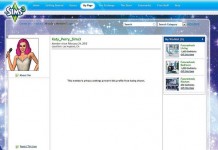
Today I was emailed a link to a very interesting Sims 3 My Page…Katy Perry’s! Well, it’s an EA promo account I’m sure, but either way, it looks official. The Avatar is identical to the Sim they have performing in all the trailers, and another thing I noticed, was the custom background (which we cannot create). Check it out!

On a side note, it is pretty low (even for EA), to actually keep a wishlist for this fake account. We all know it’s not the real Katy Perry, and even if it was, she would very much be able to afford her wishlist. Oh and EA… LET US CUSTOMIZE OUR BACKGROUNDS TOO! /end rant

Thanks to Kilara for the email! 🙂


Katy Perry My Page


SimHrvatska – SimBrother Season 2 Sign Ups


SimHrvatska is now accepting applications for SimBrother Season 2! Would you like to see your Sim make the cut? You have until March 4th to apply, so get moving! 😛


Applications for the second season SimBrothera started! Now your Sims can get the opportunity to apply and are chosen for the latest SimBrother season! The new season will be on a tropical island Livayne Way where our residents will be able to walk freely and carry out many tasks.

Continue… 


Advertisement

USA Today – Katy Perry on The Sims 3 Showtime


Video Link


Katy Perry and Electronic Arts are joining forces for The Sims 3 Showtime Katy Perry Collector’s Edition, a themed expansion pack for PCs and Mac out March 6 ($50, rated T for ages 13-up). Exclusive in-game items will celebrate the “California Gurl” and her colorful clothing, hairstyles, accessories and stage props.

Since 2000, EA’s Sims games have let players take control of the lives of little simulated people, from their love interests to career choices and home décor. More than 150 million copies have been sold worldwide.

Advertisement


Continue…


New Sim – Helen Frost by SimsVIP


Helen Frost (CC Free)

Screenshot-7


I was poking around in CAS today, and I decided it was time for a new Sim! To bring some new mystery and excitement to my game, I decided to create a Sim with a story. I’m not a story teller, but I did try my best! 😛


Helen Frost was revived by a search and rescue team in Riverblossom Hills when she was only a child. She was found underwater in a pond, after an Avalanche swept the town.

Advertisement

After years of rehabilitation, doctors have decided Helen is now able to live a normal adult life. Will she be able to move on and forget that awful day?


You need the following items/games to receive Helen Frost as is…

Sims 3 Generations, Sims 3 Late Night, Sims 3 Fast Lane, Sims 3 Master Suite, Peek-A-Boo Bathing Suit , Dolled Up Dress


 ————————————————————————————————————————————–

 Exchange Link Direct Download (SimsVIP)

————————————————————————————————————————————–


Screenshot-12 Screenshot-8 Screenshot-11 Screenshot-10 Screenshot-7 Screenshot-9


Keraloek – Ceramic Sims 3 Plumbobs


Hiki, (site owner of Sims Nieuws), has created some awesome (real!) Sims 3 Plumbob Ceramics! Everything he creates is showcased on his Keraloek blog, but you can check out all the  Sims 3 Plumbob photos on his Facebook Page. It’a always nice to see fellow player showcase their talent! 🙂


Plumbob Plumbob 2


Continue…


Advertisement

Sims Nieuws – Lunar Lakes Review


Introduction

The new World Lunar Lakes is a fantastic World full fantasy and perfect for Sims who want to escape from daily life. The story of Lunar Lakes is about the surviving Sims who landed on this alien planet, after their spaceship went down. The Sims left their spaceship in the middle of the town and built a building around it. The surviving Sims used their own technology from their planet and combined this with the found crystals, and that is how they survived on Lunar Lakes.

These smart Sims knew how to survive in this way, because of this they have been on Lunar Lakes for a couple of generations now. They built roads, created agriculture and founded a lively colony. But is Lunar Lakes something for the Simmer who does not like fantasy? In this review we, Nina and AnsjJ2, want to give you as much information on Lunar lakes as we can and we want to show you whether this world is worth purchasing.

Advertisement


Continue…


Advertisement
Advertisement

New Sims 3 My Page – Preview, Info & Help


The Sims 3 website will be updating all of our profiles to the new “Showtime Social” look this Monday. In this post you will find help and info, that will allow you to make the proper changes and get used to your new page.

————————————————————————————————————————————————


Click here for the complete list of new Sims 3 Achievements


————————————————————————————————————————————————


❗ Images below have been reduced in size, so click them for a larger view.


Warning

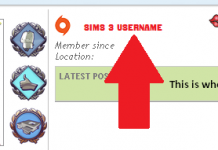
❗ First and foremost, make sure that your Origin ID is not your real name, or any other name that would personally identify you. The new changes are going to tie your Origin ID

Advertisement
and your Sims 3 user name into one account, assuming you have not already linked them yourself. If your Origin ID is something you do not want visible, Origin allows users to change their ID’s, so if you need to change it, click here.


According to SimGuruGraham, EA is going to unify our Sims 3 Usernames and Origin ID’s. Until the pages go live, and we know for sure which ID will be visible, we stand with our warning regarding Origin ID’s.


SimGuruGraham has confirmed that our Origin ID’s will not be displayed on the new my pages.


Getting Started

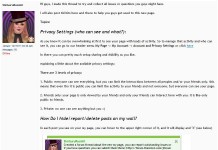
First thing is first! Make sure only the people you want visiting, interacting and seeing your profile can do so. If you have to make any friend changes, now is the time to do that! There is also a new sharing option for Facebook and Twitter, which allows you to link your Sims 3 account and auto-share activity from your game wall.


Click image for a larger view!


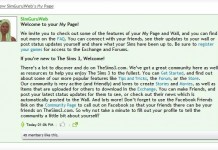
After you have set your privacy settings, become familiar with the new layout. Below is a quick overview of your my page and where to find important updates. Note that any friends you currently have will be able to access, interact and see your game wall, depending on your privacy settings.

Advertisement

When Showtime is installed, any friends with Showtime will also be able to send you Simport Requests. Of course, you will never see/receive them if you do not log into your game and accept, but this is just a warning.


Click Image for a larger view!


Unfortunately, the customization options we currently have are no longer available with this new layout. You will not be able to customize a background image, stick purchased stickers to your page, or customize any color schemes etc.


Editing Your Avatar and Profile

When editing and customizing your avatar and info page, you can click the pencil on your avatar box, or click the “About Me” tab on the left panel. Once you are in this section, you can change and edit your information, location, traits and avatar.

Advertisement


Click images for a larger view!


Adding/Removing/Blocking Friends

By clicking the “My Friends” tab on your left column, you will land on the default page for adding, pending, and blocking other members. You can search for friends and their friends, however if you are not friends with any member on the site, you will not be able to view their profile information if they have set their privacy to friends only.

To remove a friend, simply click their avatar (or visit their user page) and click “Remove“.


Click image for a larger view!


To view basic information for a friend or potential friend, simply click their avatar and their summarized preview will pop up. You can also block and remove friends via this pop up panel.


Sims 3 Achievements & Badges 

The Sims 3 has now added achievements that you can complete in exchange for badges. Your latest Sims 3 Achievements will be visible next to your avatar on your my page. At any time, you can check your completed and incomplete achievement badges by clicking “My Badges” on the left side panel. Click here for information and a complete list of Sims 3 Achievements.

When on your Sims 3 Badges Page, you can sort achievements by their type, completion, and date added. Hover over any achievement to check it’s information.

Advertisement


This is pretty much everything you will need to know about your new Sims 3 pages. Once the new layouts have gone live, we will update this post with any changes, and new information that may be available.